Reading and writing are both subjects that can take a toll on any homeschooling family. The process can seem complicated and difficult at times. After being asked to review Reading Kingdom this summer, I can honestly say that I’m not as worried about language arts for my kids anymore!
Designed for kids roughly aged 4-10 (or preschool through 3rd grade), I was able to use the program with three of my children. There was a level just right for each of their unique needs and learning levels.

The program is in the form of an online game. Initially, your child will take an introductory assessment which will place them correctly in the program based on their ability level. My youngest participating child (a preschooler) was placed in the earliest part of the program at Reading and Writing Part 1, my 6 year old was placed at the very end of Reading and Writing Part 1, and my 8 year old daughter was placed at Reading/Writing Level 4.
As we’ve been working on the program throughout the past several weeks, they have been doing exercises at least four times per week. Each child has moved on with the program at varying speeds, but each one is moving forward and learning rapidly.
Students are able to learn reading and writing in unique ways, and with fun and rewarding experiences. My kids often asked me to do Reading Kingdom first when I told them it was time to get started on our school day. Sometimes, they would ask to be able to do more than one day’s exercises because they were working toward a specific point goal to fill up their passport with pictures in the program. There are many little things like that to motivate kids to use the program and succeed!
For more information about the Reading Kingdom and how it works, check out the video below.
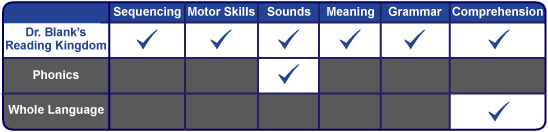
One thing that I have always been impressed with in Reading Kingdom is that the program strongly reinforces reading from left to right. When students are playing the educational game, even at the most beginning levels, they work to fill in the answers from left to right.
For example, if the student is supposed to type H A M, they have to type it in that order for it to count. This was initially frustrating for my preschooler since he doesn’t have a lot of background in reading. However, he quickly learned how he was supposed to type in his answers and has been doing it correctly ever since. This will translate to better reading now that he’s in the left to right habit!
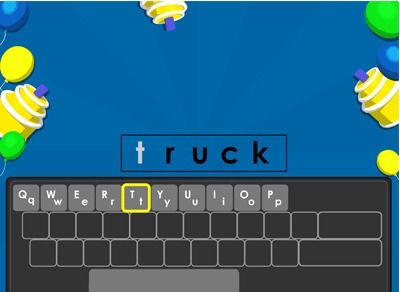
Another thing I like about the program is that you can choose to use an on-screen keyboard or your computer or laptop’s actual keyboard. My youngest learner liked the on-screen keyboard like you see in the above picture. My older 2 children preferred to use our Chromebook keyboards.
My one complaint with this is that if you have multiple children, your account can only use one keyboard selection at a time. So, for example, if one child is logged in and has chosen to use the on-screen keyboard, you can’t have another child also logged in on another devise using the physical keyboard.
This wasn’t a huge problem for us, we just had to time it so that my 2 older kids were the ones using it at the same time if we had more than one on Reading Kingdom at once.
I Love Being Able to Track Their Progress
It’s great to be able to log in at any time to see what level they are currently working on. As you can see in the screenshot below, parents and students are provided with a progress chart showing how far they are in the current level, as well as the entire program. Then it breaks it down by levels. If you click on the title of the level, it breaks the chart down even further and parents are able to specifically see what part of the program the student is working on.
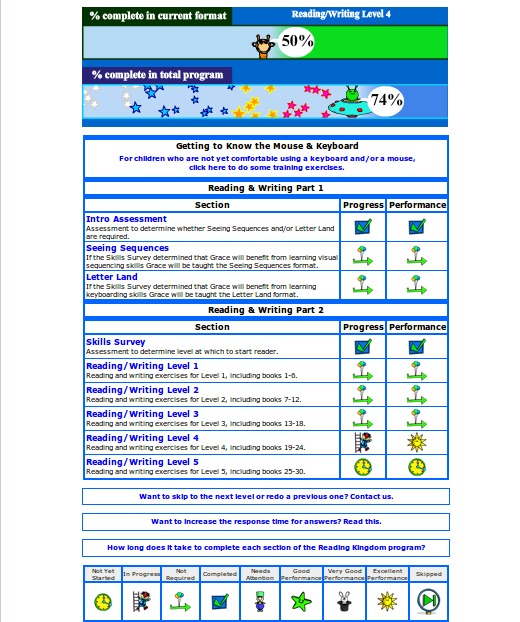
My 8 year old is finishing up the program now. As you can see from the green arrows, she tested out of completing many of the exercises, but she’s been placed in just the right spot to work on her reading and writing!
My Kids Love It
My preschooler has figured out the program and can work on it independently now. The first few times, I had to sit next to him and literally repeat what the person on the game was telling him. I didn’t offer additional help, but I think hearing it from me helped him to process it. Since then, he has weaned off of needing my help and can complete a full lesson on his own. At his level, they are short and sweet.
My 6 year old has been learning spelling! Yes, he’s learned more reading and writing skills, but I’m most excited about him learning spelling! Reading has been somewhat of a struggle for us over the past 2 years. I’m so proud to see how well he is reading, spelling, and typing in the program.
My 8 year old daughter is an advanced reader, so I had my doubts that she would benefit from this program at all. I have been pleased to see how much it has been challenging her to work on her reading comprehension and on her own spelling and writing!
I’m not sure how long it will take her to complete her current level and the last level of the program, but it is well worth the time to do it. She is gaining confidence in her writing. She has also been enjoying the spelling of it. She’s a natural speller, so when she sees it and practices it on Reading Kingdom, it really sticks with her.
Give It A Try!
If you’re interested in seeing if this program would be great for your family, there is a 30 day free trial available. After the initial trial period, Reading Kingdom is $19.99 per month or $199.99 per year for the first child, and $9.99 per month or $99.99 per year per additional child.

I was provided a complimentary subscription to this program for my 3 participating children in order to facilitate this review. All thoughts, opinions, and experiences are those of me and my family.


[…] the larger things, and that we complete all of the small items. For example, my kids will use Reading Kingdom for the rest of the school year, or until they complete the whole program. (I have a feeling my […]